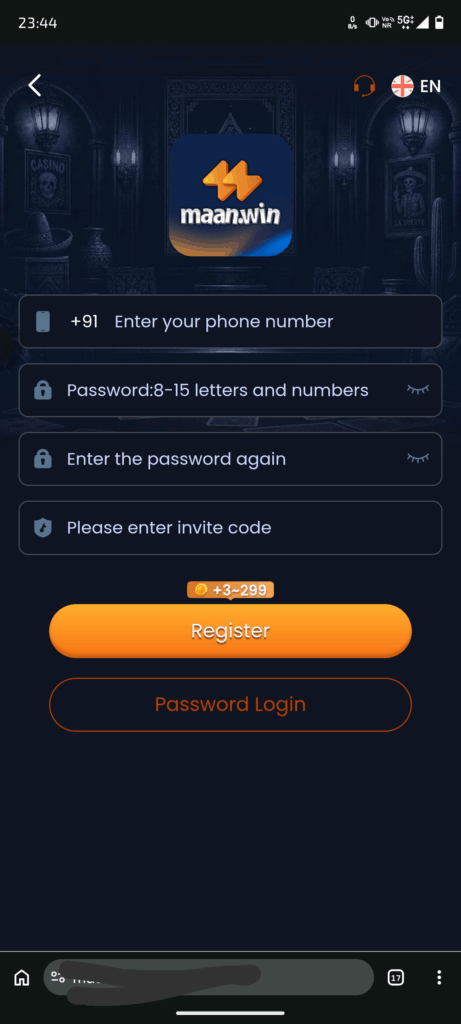
The registration page on Maan Win lets new users enter their details and create an account. Maan Win registration is the very first step for anyone who wants to use the platform and see what it offers. After the Maan Win account is ready users can log in. Explore the dashboard, games section, account settings and other options.
From a user experience point of view Maan Win registration is a part of any online platform. A clear form and simple instructions help users understand what information Maan Win requires. This helps Maan Win users know what to fill in.
This guide shows how to register on Maan Win, what to expect while creating a Maan Win account and how to log in after finishing the Maan Win process.
How to Register on Maan Win?
Follow these steps to create a Maan Win account:
Step 1: Visit the official website
Open your browser and visit the official Maan Win website. Find the registration option on the home page.
Step 2: Open the registration page
Click the Register, Sign Up, or similar option to open the account creation form.
Step 3: Submit your information
The form should be completed with the information asked. This may include your cell phone number and other account details, depending on the registration procedure.
Step 4: Create login information.
When the form asks for a password or other login information, type it in. After that, these details are utilized to sign into your account.
Step 5: Finish the confirmation
Please adhere to the verification guidelines provided on the page. Either input the required code or finish the verification step.
Step 6: Submit the registration form
Click the registration or submit button after reviewing the details you’ve entered.
Step 7: Access your account
Once registered, return to the login page or follow the on-screen instructions to create your account.
The exact registration steps depend on the form provided by the official platform. Follow the instructions displayed during account creation.
Details Required for Maan Win Registration
The information needed during registration changes with the account creation process. I find that the form shows the fields that users must fill out before they can submit their details.
Common registration fields on online platforms include:
- Mobile number: Used for account identification or verification when required.
- Password: Used to sign in to the account.
- Verification code: Used to complete the verification process when requested.
- Other account details: Additional information requested by the registration form.
From a reviewers point of view looking at the form before filling in information helps users understand registration requirements. The official page gives the accurate details about the fields needed to create an account.
Checkout more about Maan Win here: Maan Win Login.
How to Log In After Maan Win Registration?
After completing registration, users can access their accounts through the login page.
Follow these steps:
- Open the official Maan Win website.
- Click the Login option.
- Enter your registered mobile number, username, or other requested login details.
- Enter your password or complete the displayed verification step.
- Click the login button.
- Wait for the platform to open your account dashboard.
Once you log in you can explore the parts of your account. I see that the parts of your account include the games menu, your profile information, your account settings and payment options.
Frequently Asked Questions
1. Is Maan Win registration required to access an account?
Yes users need to complete Maan Win registration before users can sign in to a created account.
2. What details are needed to register on Maan Win?
The Maan Win registration form shows the information that may include a mobile number, password and verification details.
3. How long does Maan Win registration take?
The time, for Maan Win registration depends on how required details are entered and how fast the verification process is completed.
4. Can I log in immediately after registration?
After Maan Win registration is confirmed, follow the instructions to access the account immediately.
5. What should I do if registration fails?
If Maan Win registration fails, review the information entered complete any pending verification and follow instructions displayed on the registration page.
6. Can I access Maan Win from my phone?
You can access the platform through a mobile browser. An official app can also be used when a compatible version is available.
Conclusion
Maan Win registration requires you to open the registration page enter the requested information complete the verification steps and submit the form. After Maan Win registration is finished users can log in. Use the features that are available in their account.
To have an experience follow the instructions that are shown on the official page and double‑check each required field before you submit the form. This way you will understand Maan Win registration better. Can move on to the next step of using Maan Win.